Category

CAS 360

CAS 360 Product Update – March 2022

By BGL Update, CAS 360No Comments

The CAS 360 March 2022 update release is a huge release, to coincide with the BGL REGTECH 2022 running across the country we have released some of the most exciting features for our users. 

What's new?

Automated Debt Reminders

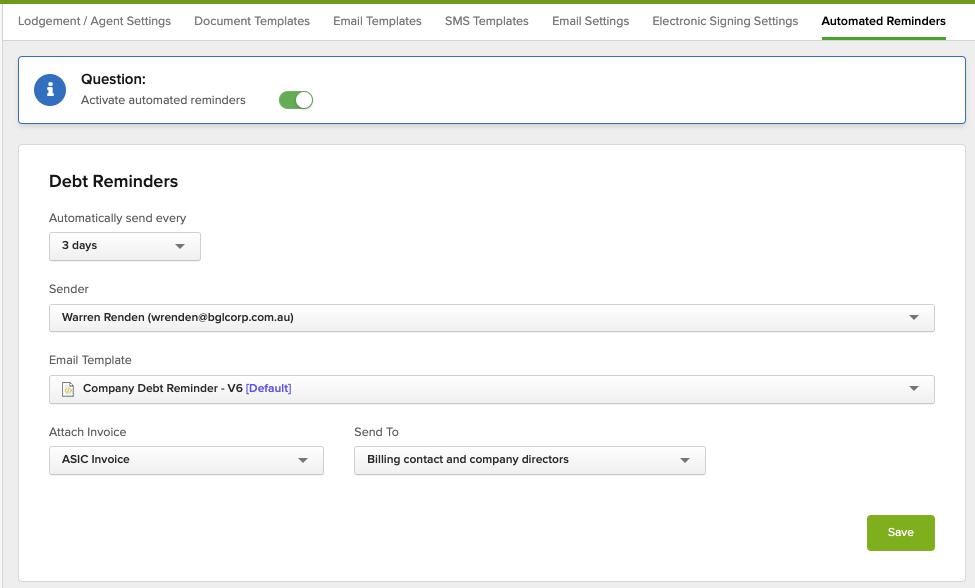
The time for an automated, set and forget ASIC debt management (pictured right) has arrived. CAS 360 can now automatically remind your clients of their outstanding debts to ASIC. 

In the settings menu, Automated Reminders has been added. This feature needs to be activated by your firm before it starts sending reminders. 

You have control over the frequency of reminders, who the sender is, the email template used, the invoice attached and who the emails are sent to. 

The reminders will be sent throughout the day, and almost always within business hours. The reminders will be sent when the debt checking and verification process with ASIC has been completed.

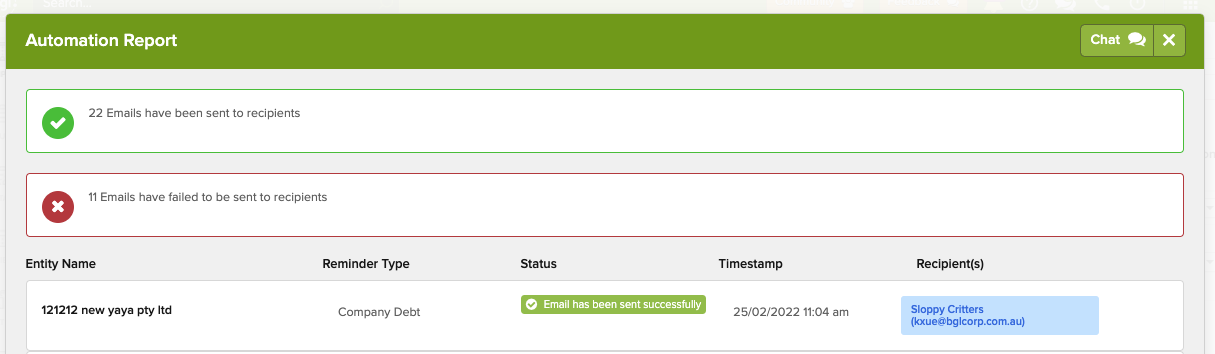
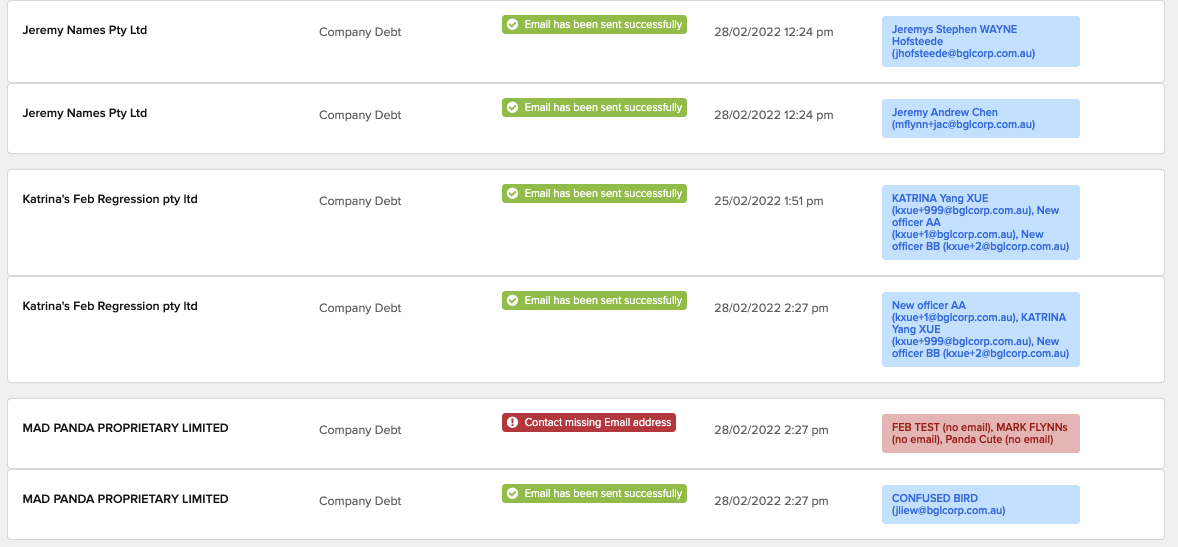
We have also implemented an Automation report (pictured right) that will be shown to users who have the automated reminders activated. 

If you have set up automated reminders, and no email address has been provided for the contacts in that company, you will be notified that an email could not be sent from CAS 360. 

The automation report will also include Automated Document Reminders that have been sent sine the last time the user logged in. 

The automation report can also be exported to PDF or MS Excel. 

The automation report will be shown to the user on login, if there have been reminders sent by CAS 360 on the account since their last log in.

Purchase Constitutions 

In 2021 Changes were made to CAS 360 to allow all firms to lodge company incorporations with ASIC, directly from CAS 360. All that is required, is your agent to have a direct debit account with ASIC. That’s it. 

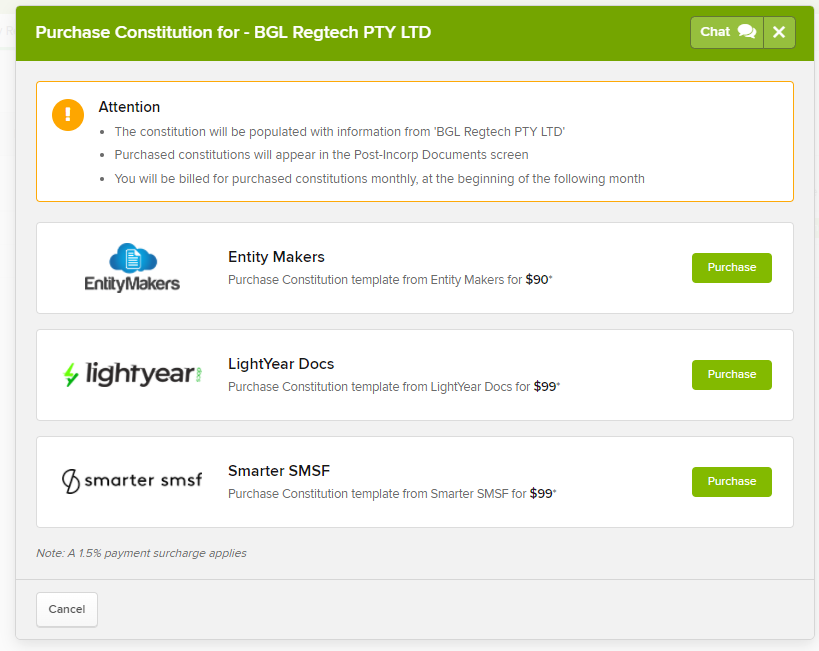
Building on that great enhancement, we have now added the ability for you to purchase a company constitution directly from within CAS 360 (pictured right). 

We have partnered with Entity Makers, LightYear Docs and Smarter SMSF to bring this great feature to you. 

If you have considered registering companies in CAS 360, you now have all of the documents required, including a company constitution, and the software to do it 😃

Advanced Document Screen Filters

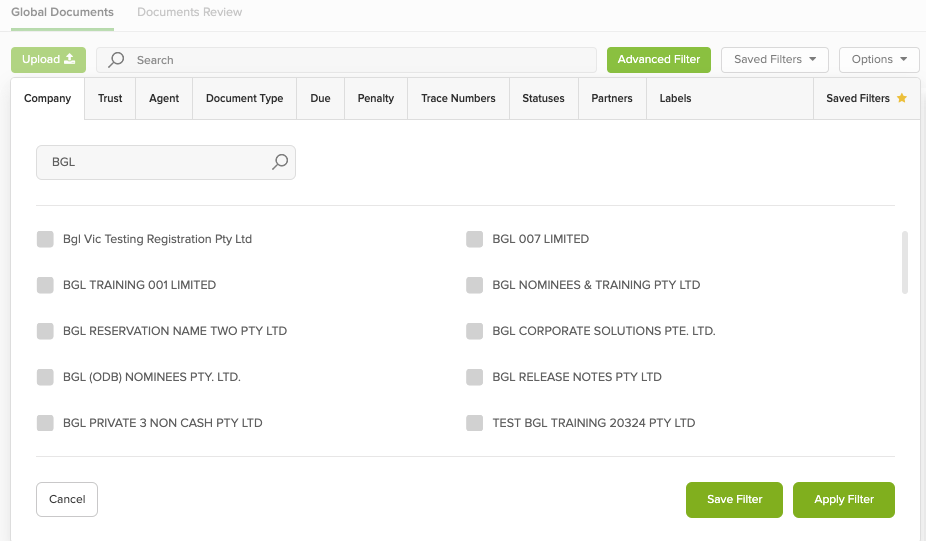
The Global Documents screen (pictured right) in CAS 360 is one of the most used and frequented screens, and we have now added a powerful search to help you find anything you need on this screen.

From the documents screen, you can now create your own filters and even save that as the default, did anyone ask for label filters? Yes, you did, you know who you are. We have label filters and much more.

You can now filter document records by:

Company Name, Trust Name, Agent, Document Type, Due Date, Penalty, Trace Number, Document Status, Partner and Labels!

All filters can be saved, and all saved filters are accessed at the click of a button.

The document screen has never been so powerful.

2-Factor Authentication for Digital Signing

Users can now require 2-factor authentication on digital signing documents. This can be a requirement for the whole document pack or just for individual signatories.

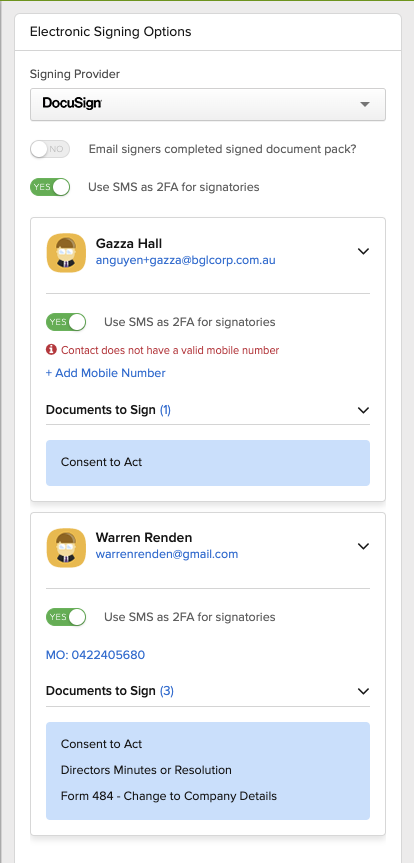
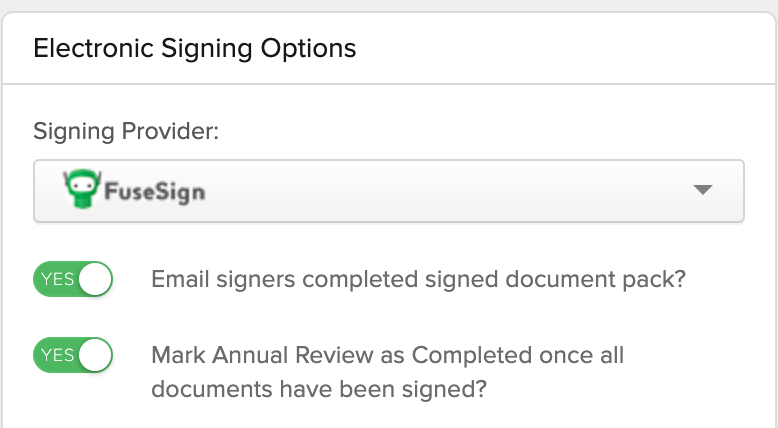
As part of this feature, we have also re-designed the whole Electronic Signing Options screen (pictured right).

From this screen, you can toggle on the 2-factor authentication requirement. You are also able to select which signers have this requirement.

From this screen, you can also add email and phone numbers to the contact record, as well as see the documents that the contact is going to be required to sign.

As the 2-factor authentication for digital signing is handled by CAS 360, there is no additional cost to use this.

Also in this update is the ability for users to void a Digital Signing document from within CAS 360, this can be done on the documents screen, via the Options dropdown.

Lastly with digital signing, now when selecting for the signers to receive the completed signed document pack, the preparer will also receive the completed document pack via email.

Director ID added to Annual Review screen

The Director ID features from the Companies screen have now been added to the Annual Review screen, this allows users to check the Director ID status of each company prior to the annual review being sent out. 

A number of other Director ID features have also been added to this release, now we will validate the Director ID number that is entered in, this will be checked with the Director ID algorithm. Also when preparing Officer appointments and Company Registrations the Director ID letter will be included.  

Ability to CC company contacts in Multi-Annual Review process

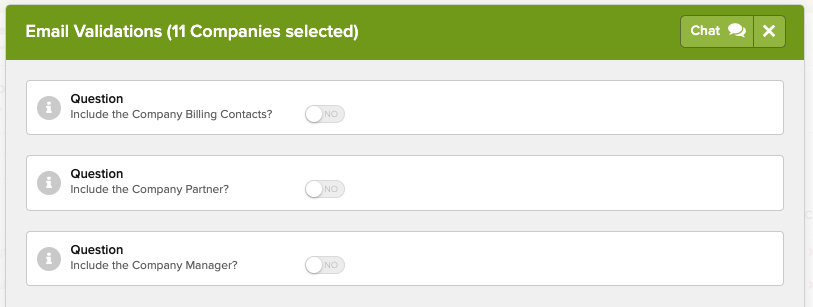
Users now have the ability to automatically include important company contacts such as Billing Contacts, the Partner or the Manager when processing Annual Reviews.

This can be done on the Email Validations step, where you can see all the emails that are going to be sent out. Toggling on these options will add the email addresses for each company’s annual review.

All of this and so much more includes the ability to remove lodgement permissions for users, enhancements for Joint Members and Trusts via multi-company documents, improvements to our Officers API, a new consent to short notice for the AGM, and improved support for more than one Annual Review per year when a company changes it review date.

BGL celebrates CAS 360’s 5th anniversary

By BGL Update, CAS 360No Comments

BGL celebrates CAS 360's 5th anniversary

BGL is proud to celebrate the 5th anniversary of its cloud-based ASIC corporate compliance and trust management software solution, CAS 360.

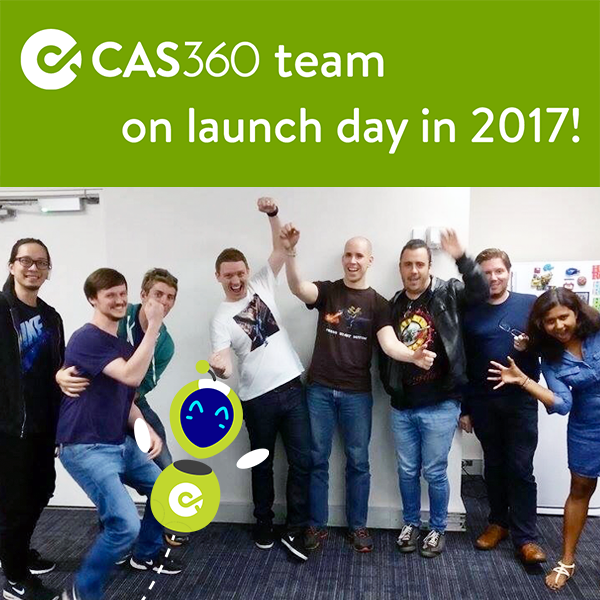
“I’m incredibly proud of the team and their achievements over the past 5 years” said Ron Lesh, BGL’s Managing Director. “When we launched CAS 360 on 22 February 2017, our product team consisted of 7 members: Warren Renden, Andy Tam, Mark Flynn, Adam Polat, Dubi Laviati, Jeremy Hofsteede and Olly Weinmann. And in just 21 weeks, the team added over 600 clients and 100,000 companies to the platform. It’s been full steam ahead since then.”

“Today, the CAS 360 product team has grown to 23 members supporting 2,600+ clients, 640,000+ companies and 100,000+ trusts across Australia, New Zealand and Singapore” continued Lesh.

CAS 360 has revolutionised the way ASIC corporate compliance work is managed in Australia with its streamlined Annual Review process, including automated tracking, downloads, database comparison review and delivery of the annual statement pack to clients. Plus, daily automated smart alerts help users easily manage Annual Review dates, document deadlines and company debt.

In the past 5 years, CAS 360 clients have added 2.2m contacts, prepared 5.4m document packs, sent 2.1m emails and processed 230k dividends. Quite an incredible achievement!

“The future is bright for CAS 360” added Lesh. “We have big plans for 2022 including the official release of CAS 360 Singapore (currently in beta), the release of CAS 360 Hong Kong, the start of work on CAS 360 United Kingdom and further development in Australia and New Zealand. Certainly, watch this space!”

Watch CAS 360 DemoCheck out the TOP 50 CAS 360 features

CAS 360 Product Update Release – January 2022

By BGL Update, CAS 360No Comments

We are excited to announce the first CAS 360 update of 2022! You can read the full release notes on the BGL Community >>>

What's new?

Annual Report and Documents: The Directors Report and Directors Declaration has been added to the CAS 360’s Annual Reports and Documents screen.

Director ID Improvements: A new Director ID ABRS Letter has been added to CAS 360’s Document Production screen for Annual Reviews. This means users can now send the ABRS Director ID letter to their clients as part of the Annual Review process.

Plus, CAS 360’s new Director ID report allows users to quickly and easily export all the Director ID information in CAS 360 to Excel.

Notifications: The performance of the Notifications and Inbox screens in CAS 360 have been improved. Users can also now prepare a Notifications report from the Inbox screen.

ASIC Balance Merge Field: CAS 360’s Annual Review company letter now supports a ${companyAsicBalance} merge field.

Plus, many more features and improvements. Don’t forget to check out the full release notes on the BGL Community >>>

BGL announces the launch of CAS 360 Hong Kong

By BGL Update, CAS 360No Comments

BGL is proud to announce the highly anticipated launch of its corporate compliance solution, CAS 360 in Hong Kong. 

“BGL has had a presence with our CAS Desktop software in Hong Kong since 2000” said Ron Lesh, BGL’s Managing Director. “Our clients have been hanging out for information on when CAS 360 will be available to them in Hong Kong so I’m proud that we can today announce this will be Quarter 2, 2022.”

“The CAS 360 team has been working tirelessly to build CAS 360 for multiple jurisdictions” added Lesh. “We have released New Zealand, are in BETA in Singapore and next off the rank is Hong Kong. I’m excited we can bring this sensational software to Hong Kong in mid-2022. CAS 360 will streamline our client’s processes with innovative and unique technology. It will save them heaps of time so they can focus on their many, many other responsibilities.”

“CAS 360 will prepare all the forms, minutes / resolutions, registers and other documents required for the annual return and common changes made by Hong Kong companies” noted Lesh. “CAS 360 is the complete package and will provide the same incredible efficiencies for our Hong Kong clients as it does for 600,000+ companies in other jurisdictions”. 

To register your interest in CAS 360 Hong Kong, please visit https://pages.bglcorp.com/CAS-360-hk-express-interest 

Director IDs: How can CAS 360 help?

Streamline Director IDs with CAS 360

By BGL Update, CAS 360, IndustryNo Comments

CAS 360 is helping ASIC registered agents manage and streamline Director IDs for their clients!

CAS 360 is Australia’s leading cloud solution for the management of companies and trusts.

The recent introduction of Director IDs means Australian company directors are required to identify themselves with the ABRS via MyGovID between now and November 30, 2022.

ASIC Registered Agents help businesses handle the compliance requirements of the vast majority of Australian companies, so the job to ensure every company director has a Director ID will ultimately fall on their shoulders…

That’s where CAS 360 can help!

To help manage and streamline the administration of these new requirements for ASIC Registered Agents, BGL released a suite of Director ID features in CAS 360. We have not just “added a field” to record the Director’s ID. We have provided a suite of features to help you through the process. Click here to skip ahead to our video >>>

Director ID Alert

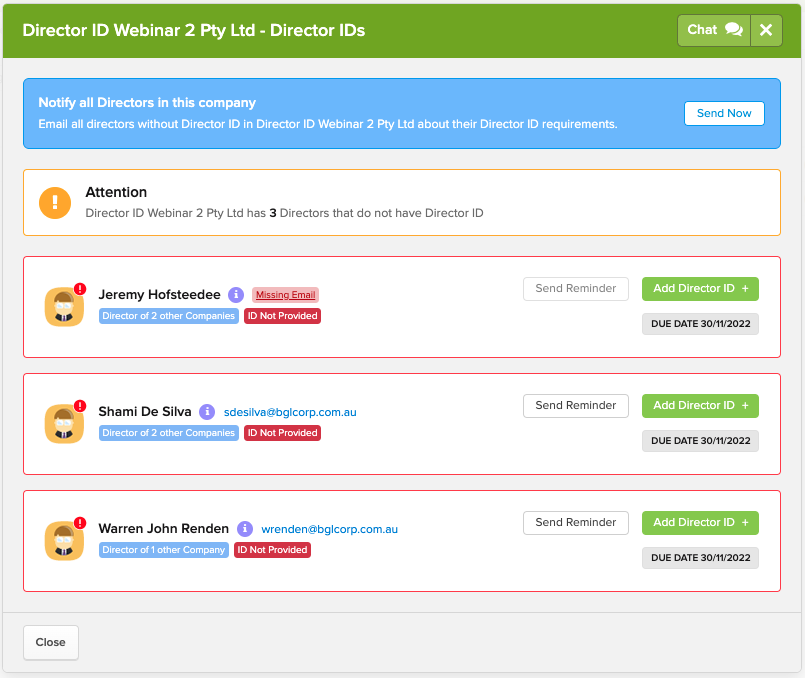
The Director ID alert will show CAS 360 users the company directors that have completed their Director’s ID.

Director ID Screen

The Director ID screen provides CAS 360 users with the ability to:

  • Send a customisable email to all company directors about the new Director ID requirements,
  • Send email reminders to company directors when the Director ID deadline is approaching,
  • View which company directors have not completed their Director ID requirements,
  • See if a contact is a director in multiple companies,
  • Add a director’s email address, and
  • Add a director’s ID number once the director has completed registration.

See CAS 360’s Director ID features in action!

Watch our video to hear from BGL’s Head of CAS 360, Warren Renden and see a live demonstration of the Director ID features available now!

If you would like to learn more about CAS 360 and how it can benefit your business, contact the BGL sales team on 1300 654 401 or email [email protected].

Director IDs: How can CAS 360 help?

CAS 360 Product Update Release – October 2021

By CAS 360, Product UpdatesNo Comments

Hello all and welcome to the spooky season! It’s almost Halloween and we have another BIG CAS 360 update full of delicious treats for you!

Don’t forget to join the conversation about this release and so much more on the BGL Community >>>

What's New in CAS 360?

Director ID

The introduction to Director ID is one of the biggest changes to corporate compliance work for a very long time. All Australian company directors are now required to identify themselves with the ABRS, via MyGovID between now and November 30, 2022.

In CAS 360 we have built a great set of features to help you through this new requirement.

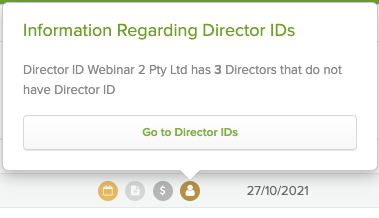
Each company now has a new alert, the Director ID alert. This alert will show how many company directors have completed that Director ID requirement when you hover over.

To view more information the user can click on ‘Go to Director IDs’

The Director ID modal contains a number of important features.

  • Firstly you can email all company directors about the new Director ID requirements, we have included an “introduction to Director ID” email template, which you can customise, to let your clients know about this new requirement.
  • You can see which Directors have and have not completed their Director ID requirements
  • You can also see if the Director is also a director in any other company
  • If the Director ID deadline date is fast approaching, you can send a reminder email to the director
  • If you do not have a director’s email address, you can add the email address via this screen
  • Also, once the Director has completed their Director ID requirements, you can add the ID number, and it will be saved against the Directors records

Digital signing improvements

We have also added some great new features for clients who have CAS 360 integrated with our Digital Signing partners. Now when preparing any set of documents in CAS 360, you can set that all signatories receive the signed document pack once it has been signed by all signatories. This is an option that is controlled by you as the preparer.

If you are preparing an Annual Review and send it out for digital signing, you can now have the Annual Review automatically set as ‘Annual Review Complete’ when the document has been signed by all signatories.

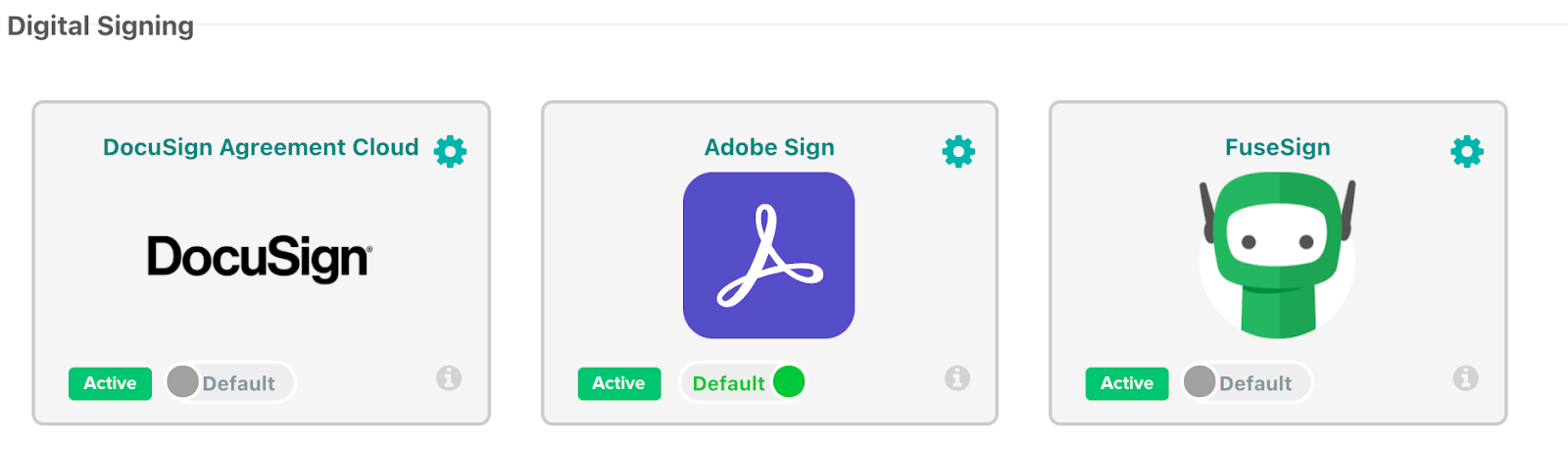
Also, for those that have an account with more than one digital signing provider or are in the process of transitioning from one provider to another we have now added support for multiple signing providers connected to CAS 360 at the same time.

Company shareholder and trust unitholder registers

Next up is a whole new way of preparing Company Shareholder and Trust unitholder registers, we have built a beautiful MS Excel export of these registers. We know how much you all love a good spreadsheet. CAS 360 now allows you to export these holdings and filter, sort or organise to your heart’s content.

Plus, so much more!

There is so much more in this update, we have added version 2 of our document management APIs for those that have your documents integrated. We have a new trust relationship position in Alternate Appointer, improved the Company screen hovers so they are less sensitive, added new merge fields for addresses and capital.

Enjoy!

CAS 360 Product Update Release – September 2021

By CAS 360, Product UpdatesNo Comments

Hello all and welcome to Spring! We have another BIG CAS 360 update for you!

Don’t forget to join the conversation about this release and so much more on the BGL Community >>>

What's New in CAS 360?

Company Incorporations

Let’s kick off with Company Incorporations. Now you can start using CAS 360 for Company Incorporations, the previously required digital certificate has been removed, all that is required now is a direct debit account with ASIC. 

All company incorporations from CAS 360 are done for the ASIC fee only. It has never been faster or easier to incorporate companies. 

While CAS 360 does not currently have a constitution, we will soon, keep your eyes open.

Minutes and Resolutions

Next, we have made some big improvements to our minutes and resolutions. Share and Unit transactions now show more information about each transaction, including effective dates. We have also added thousands separator commas to all Director, Trustee, Member and Unit holder minutes / resolutions. Share and Unit certificates have also been improved. 

File Upload Security

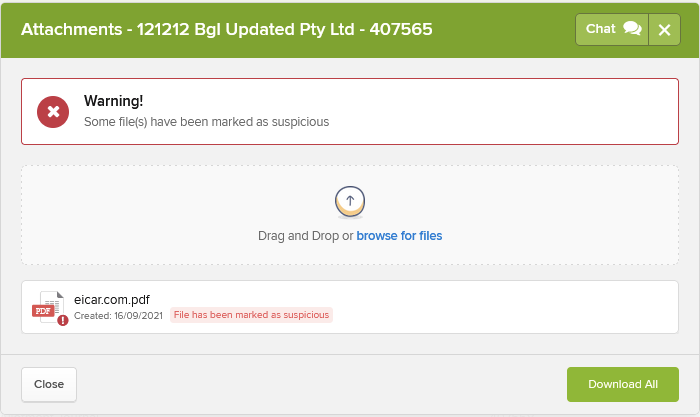
Security is an important part of all software applications these days and CAS 360 is no exception, we have now added system wide file scanning on all uploaded documents. From this update, every uploaded file will be virus scanned, and you will be notified if the document is marked suspicious.

Report Improvements

Reports have been updated with the People group report now showing more trust relationship information, the Address Usage report now showing all addresses, with the ability to filter the new address types. The Companies Listing report options are now dynamic to your firm’s data (i.e options that are not relevant won’t be shown)

User Interface Improvements

Last and certainly not least we have made a number of interface changes to improve how CAS 360 works. 

Now all screens that have a table (Company, Documents, Annual Reviews etc.) have a sticky header. This means that as we scroll down the page, the headings will stay visible, this is a great improvement. 

We have also redesigned the company notes screens in company selection with a new modern look, and also the SMS messages conversation box has been updated with a fresh new look.

Thanks a million – CAS 360 hit 1,000,000 Annual Reviews!

By CAS 360, Homepage, Industry, NewsNo Comments

Thanks a Million!

Last week CAS 360 passed a major milestone, there has now been more than 1 million ASIC Annual Reviews processed in CAS 360!

This is a massive milestone, and we are so thankful to our clients who use CAS 360 every day to complete their corporate compliance work. Without the faith and trust, you have put into the product we would not have come close to this number, we are forever grateful.  

We built CAS 360 with the intention to streamline and automate as much of the corporate compliance job as possible, the Annual Review was always the centerpiece of this. 

CAS 360 has now over a million times automatically downloaded Annual Reviews from ASIC, automatically alerted the user via the Annual Review Alert, automatically compared the data in CAS 360 to ASIC, and after a few clicks generated the Annual Review document pack, email delivered that pack to the company directors, and automatically marked up for digital signing. 

We hope for all of the CAS 360 clients, we have been able to streamline your processes and allow you to spend more time on other meaningful work. Also, we hope that businesses are receiving their documents earlier and signing them easier than ever before. 

We are also so proud to play a part in generating revenue for our clients. If our clients are charging $250 as a service fee for completing the Annual Review, that means… Oh right,  you’re probably an accountant… You know how much has been generated by firms.

Of course, in 2021 we have made this process even more streamlined with the release of Multi Annual Reviews, allowing users to complete their Annual Reviews for the day/week in one simple process. 

However, we are not done with it yet, we have one of our biggest and best innovations yet to come later in 2021, focused on streamlining one more area of the Annual Review process… Stay tuned!

BGL launches integration with digital signing tool FuseSign!

By BGL Update, CAS 360, Simple Fund 360, Simple Invest 360No Comments

Digital Signing, Electronic Signing, Electronic Signature, Company Compliance, Corporate Compliance, Companies, Trust Administration, Trust Management, Trusts, Self-managed Superannuation Fund, Self Managed Super, SMSF, SMSFs, Investment Portfolios

BGL Corporate Solutions, Australia's leading supplier of SMSF administration, ASIC corporate compliance and investment portfolio solutions, is proud to announce CAS 360, Simple Fund 360 and Simple Invest 360 are now integrated with digital signing tool FuseSign by FuseWorks.

“It’s great to add FuseSign to the BGL Ecosystem” said Ron Lesh, BGL’s Managing Director. “FuseSign creates a seamless workflow for BGL clients so that all company, trust, individual and SMSF documents can be digitally signed, speeding up the compliance process and reducing signing times to minutes rather than days for the price of a stamp.

Melissa Voss, Co-Founder and Head of Clients and Partners at FuseWorks, said: “We’re thrilled with this partnership and to be able to offer BGL clients with our Digital Signing tool straight from their platform. I am passionate about automation and helping Accountants to simplify the day-to-day, removing inefficiencies through the power of automation so they can focus on more human tasks, and that is exactly what FuseSign does, it gives your clients a better experience with your brand, saves your business time and money, and it empowers your team to focus on tasks they really enjoy.”

Made for accountants by accountants, FuseSign is an affordable, intuitive and easy to use Digital Signing tool and can be used for all company, trust, individual and SMSF documents prepared by CAS 360, Simple Fund 360 and Simple Invest 360. Recent legislative changes have now made it possible to sign more document types digitally than ever before. The FuseSign process in BGL applications provides a seamless workflow for clients. And recent evaluations of digital signing solutions have proven documents are signed quicker, easier and with much less friction when digital signing solutions are used.

BGL currently has over 350 partners in our Ecosystem and it is great to be able to add FuseSign to the list.

For more information about this sensational integration, visit www.fusesign.com/bgl 

About FuseSign

FuseSign is a digital signing platform like no other. Made by accountants for accountants, it is an elegant solution that simplifies complex tasks, resulting in faster turnarounds, significant cost savings, improved client experience and higher staff engagement.

Digital Signing, Electronic Signing, Electronic Signature, Company Compliance, Corporate Compliance, Companies, Trust Administration, Trust Management, Trusts, Self-managed Superannuation Fund, Self Managed Super, SMSF, SMSFs, Investment Portfolios

CAS 360 Product Update Release – July 2021

By BGL Update, CAS 360, Product UpdatesNo Comments

We are excited to announce a huge CAS 360 update!

Another huge release for our emerging markets with both New Zealand and Singapore getting some great new features!

Australia

Performance Enhancements for all company data screens

In this update we have been able to focus on some under the hood enhancements, including the re-writing of the company data screens. These screens are now more efficient, consistent and faster than ever.

Commas added to all numbers in CAS 360

This has been a request from a number of users over the last few years, and we’re very happy to release this. Now all numbers in CAS 360 will have the correct commas or equivalent based on the currency for $ amounts. 

CAS 360 already has industry leading features when it comes to managing share/unit structures, this will make sorting and searching this information much easier. 

Added Effective Dates

We have made improvements to all our system minutes and resolutions to now include effective dates for all transactions. 

This will make all minutes and resolutions more complete, as all effective dates are clear and consistent. This will also make it easier than ever to prepare multiple transactions with different effective dates on the same minute or resolution. 

Company Type filter added to reports

Users can now filter by company type when preparing a company listing report. This will allow more flexibility when preparing reports. For example a report listing only the foreign companies can now be prepared.  

There have been a number of other improvements including view only users are now able to download trust deeds, UI improvements to both the SMS screen and the Getting Started process. Also all register names in the reports screen have been updated. 

New Zealand

This update includes a number of new and exciting features for AML in New Zealand. 

AML Provider API

First of all we have officially released our identity verification API for identity providers to consume, over the next few weeks we will be meeting with various identity providers and working through the integration.

Our plan has always been to offer an integrated identity verification solution which allows you to use the information already in CAS 360 and get this information verified. 

AML Enhancements

We have also released a number of feature improvements to the Compliance tab for Companies, these include

  • Moved Level of CDD Required to step 4
  • Risk assessments screen enhancements
  • Added information icon to individual sections
  • Added drivers licence expiry
  • Added ability to attach extra individuals to contacts section of Compliance tab
  • Updates to Compliance Report and Compliance Listing report
  • Displaying Shareholder % next to shareholders
  • Improved PEP check logic and added to individual contact record
  • Added ability to upload utility bill or bank statement to verify address details
  • Improved UI for Risk Assessment questions
Performance Enhancements for all company data screens

In this update we have been able to focus on some under the hood enhancements, including the re-writing of the company data screens. 

These screens are now more efficient, consistent and faster than ever.

Commas added to all numbers in CAS 360

This has been a request from a number of users over the last few years, and very happy to release this. Now all numbers in CAS 360 will have the correct commas or equivalent based on the currency for $ amounts. 

CAS 360 already has industry leading features when it comes to managing share structures, this will make sorting and searching this information much easier. 

Added Effective Dates

We have made improvements to all our system minutes and resolutions to now include effective dates for all transactions. 

This will make all minutes and resolutions more complete, as all effective dates are clear and consistent. This will also make it easier than ever to prepare multiple transactions with different effective dates on the same minute or resolution. 

Company Type filter added to reports

Users can now filter by company type when preparing a company listing report. This will allow more flexibility when preparing reports. For example a report listing only the foregin companies can now be prepared.  

There have been a number of other improvements including view only users are now able to download trust deeds, UI improvements to both the SMS screen and the Getting Started process. Also all register names in the reports screen have been updated. 

Singapore

AML Provider API

First of all we have officially released our identity verification API for identity providers to consume, over the next few weeks we will be meeting with various identity providers and working through the integration.

Our plan has always been to offer an integrated identity verification solution which allows you to use the information already in CAS 360 and get this information verified. 

Notice of Registrable Controllers

In this update we have added the ability to prepare the Notice of Registrable Controller for Singapore companies. This can be added from the Company Shareholders screen. 

Registrable Controller notice Types

This update includes support for 4 types of registrable controllers notices. These include

  • Notice for Controllers 386AG(2)(a)
  • Notice for Persons who knows Controllers 386AG(2)(b)
  • Notice for Change in particulars 386AH(1)
  • Notice for Incorrect Particulars 386AI(1)
Registrable Controllers Documents

This update also brings Registrable Controller Documents to CAS 360, these documents include

  • Confirmation Letter
  • Register of Registrable Controllers
  • Notice for Controllers 
    • Notice for Controllers 386AG(2)(a)
    • Notice for Persons who knows Controllers 386AG(2)(b)
    • Notice for Change in particulars 386AH(1)
    • Notice for Incorrect Particulars 386AI(1)
Shareholders quick add

The Shareholders quick add has been updated for Singapore, this now includes important information fields such as Nationality, ID Type, ID Number and the ability to add a passport. 

Register of Auditors

A new Register of Auditors Report has been added to the Company Reports screen, this new register can be prepared for any company and can be dated on any date, allowing any user to prepare the register at the date that is required. 

Performance Enhancements for all company data screens

In this update we have been able to focus on some under the hood enhancements, including the re-writing of the company data screens. 

These screens are now more efficient, consistent and faster than ever.

Commas added to all numbers in CAS 360

This has been a request from a number of users over the last few years, and very happy to release this. Now all numbers in CAS 360 will have the correct commas or equivalent based on the currency for $ amounts. 

CAS 360 already has industry leading features when it comes to managing share structures, this will make sorting and searching this information much easier.

Added Effective Dates

We have made improvements to all our system minutes and resolutions to now include effective dates for all transactions. 

This will make all minutes and resolutions more complete, as all effective dates are clear and consistent. This will also make it easier than ever to prepare multiple transactions with different effective dates on the same minute or resolution.

Other improvements

There have been a number of other improvements made to CAS 360 Singapore, these include updating company dates when an Annual Return payment has been completed, improvements to the Register of Nominee Directors, improvements to the Annual Return Listing Report, new validations on the Auditors screen, Improved AGM & Annual Return date calculator, ACRA Company Extracts will now import the financial year end date and enhancements to the ‘Getting Started UI’.